Where Audit and Compliance Software Costs Hide
Audit and compliance software costs rarely sit in one obvious line item. This guide shows CFOs, CIOs and procurement leaders where spend hides, from licence roles and integrations to Salesforce evidence requirements and renewal clauses.
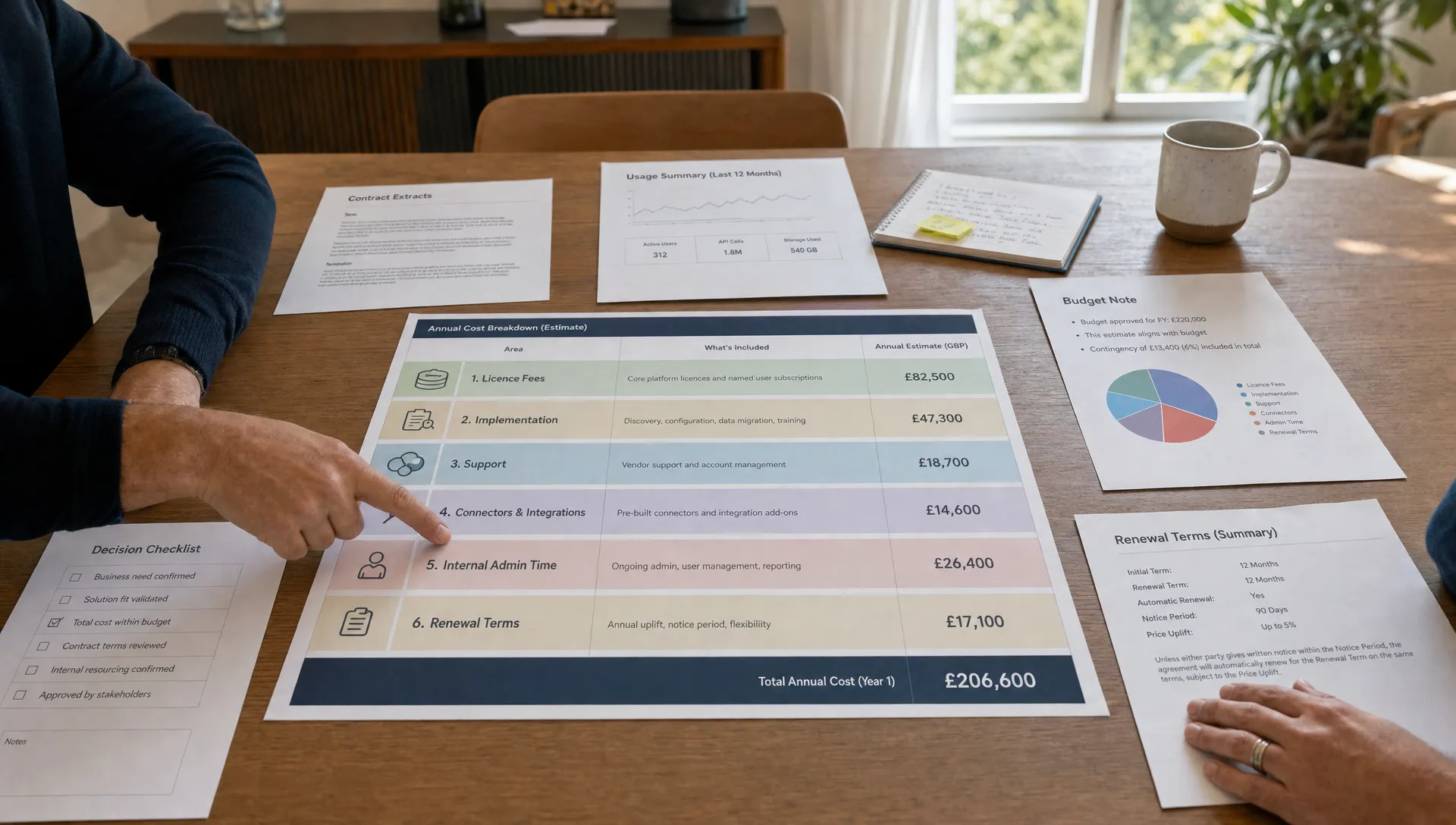
Audit and compliance software is often bought with good intent: cleaner evidence, fewer manual checks, faster audits and less risk sitting in spreadsheets. Yet the cost rarely sits neatly in the licence line. It spreads across user roles, control scope, integrations, implementation partners, data retention, admin time and renewal clauses.
For CFOs, CIOs and procurement leaders, the problem is not that the software has no value. The problem is that the buying case often treats compliance as a fixed requirement when, in practice, it is a moving commercial surface. Every new framework, data source, workflow, connector and evidence owner can change the cost profile.
In Salesforce estates, this becomes even more visible. Audit and compliance tooling may need to read CRM activity, user permissions, security settings, approval histories, field changes, integrations and customer data flows. If those requirements are not mapped before commercial talks begin, the organisation can end up paying for breadth it does not use or missing capabilities it later has to buy under pressure.
The first hiding place: who really needs a paid seat?
Seat design is one of the most common sources of overbuying. Many audit and compliance software proposals start with a clean user count, then become messy once real workflows appear.
The first question is not “how many people are involved in compliance?” It is “what does each person actually need to do?” A control owner who uploads evidence once a quarter should not automatically be costed the same way as a platform administrator. An internal auditor who reviews evidence may not need the same licence as someone designing controls and workflows. A senior stakeholder who only needs read access to dashboards may not need a full paid role at all.
The costly mistake is buying around job titles instead of access patterns. Finance, IT, legal, security, risk, sales operations and external advisers may all touch the process, but they do not all create equal system demand.
Before accepting a user-based quote, ask the vendor to separate:
- Full administrators who configure the system
- Control owners who submit and maintain evidence
- Reviewers who test, approve or challenge evidence
- Executives who only need reporting access
- External auditors or advisers who need temporary access
If these roles are blurred, your commercial model will be blurred too.
The second hiding place: compliance scope that outgrows the business case
Audit and compliance software can quickly become a catch-all for every framework the organisation might one day care about. ISO, SOC 2, SOX, GDPR, sector-specific controls, internal risk policies and customer security questionnaires are often discussed in the same buying cycle.
That breadth can be useful, but only if the value case supports it. If the immediate need is evidence collection for a narrow audit, buying a broad GRC-style platform may add unnecessary configuration, licences and support. If the organisation genuinely needs multi-framework control mapping across regions, a lightweight checklist tool may be too thin and create future rework.
The cost hides in the gap between the compliance story and the evidence reality. A good buying process starts with the controls you must evidence, the systems that hold that evidence and the people responsible for keeping it current. If you are still at the selection stage, this guide to choosing compliance audit software without buying too much covers that discipline in more detail.
The useful question is simple: which audit outcomes are we funding now, and which future possibilities are we being asked to prepay?
The third hiding place: Salesforce evidence is not always included
Many organisations assume audit software will simply “connect to Salesforce” and pull what is needed. Sometimes it will. Sometimes it will not. The difference can matter commercially.
Salesforce evidence can include user access, permission sets, login history, field changes, approval records, configuration changes, data exports, integration activity and admin actions. Some evidence may sit in native Salesforce functionality. Some may require specific Salesforce products, settings, retention periods or API access. Some may sit outside Salesforce altogether, in identity platforms, data warehouses, ticketing systems or third-party apps.
This is where cost can appear late. A compliance tool may have a Salesforce connector, but that does not mean the connector covers every evidence requirement in your audit plan. You may need extra configuration, custom reporting, additional Salesforce capabilities, data storage changes or external implementation work.
For example, teams that rely on field-level history need to understand exactly what Salesforce retains, for how long and under which product conditions. Salesforce explains the relevant capability in its Field Audit Trail documentation, which is worth checking before you assume the audit platform can solve retention gaps on its own.
A procurement file should therefore include a plain-English evidence map: what evidence is needed, where it lives, who owns it, how long it must be retained and whether the proposed software can access it without paid extras.

The fourth hiding place: implementation is treated as a small side cost
The licence cost is often easier to negotiate than the work required to make the tool useful. Implementation can include control mapping, workflow design, Salesforce connection setup, SSO configuration, data import, reporting templates, user training and test cycles.
That work may be carried out by the vendor, an implementation partner, an internal IT team or a mix of all three. If responsibilities are not explicit, cost lands in the least visible place: internal time.
This matters because audit and compliance tools touch sensitive operating areas. A poorly configured workflow can create noise for control owners. A weak Salesforce integration can produce evidence gaps. A rushed implementation can leave finance paying for software that technically exists but is not trusted by auditors or the business.
The commercial risk is not only the implementation fee. It is the cost of buying software before the organisation has capacity to deploy it properly.
| Cost area | Where it hides | Question to ask before signing |
|---|---|---|
| Configuration | Control libraries, workflows, evidence templates | Who builds this, and is it included? |
| Salesforce connection | Connector setup, API access, field mapping | What evidence is covered without custom work? |
| Identity and access | SSO, user provisioning, external auditor access | Are temporary and read-only users priced differently? |
| Reporting | Board packs, audit reports, exception tracking | Are required reports standard or paid configuration? |
| Training | Admin training, control owner onboarding | How many sessions are included, and for whom? |
This is also where broader Salesforce ecosystem costs creep in. Advisory firms, AppExchange tools, managed service providers and implementation partners can all add value, but they can also fragment accountability if no one owns the full commercial view. SaaSed has written separately about Salesforce ecosystem hidden costs for teams trying to bring that wider picture under control.
The fifth hiding place: add-ons that sound minor during negotiation
Audit and compliance software proposals often include optional modules that feel harmless in the room. Advanced analytics. Vendor risk. Policy management. AI evidence review. Continuous monitoring. Extra framework packs. Premium connectors. Sandbox environments. Enhanced support.
Some of these may be worth buying. The issue is timing and proof. If a module is not required for the first audit cycle, there should be a clear reason to buy it now rather than retain optionality. If the vendor is bundling it at a discount, procurement should check what happens at renewal. A discounted add-on can become a full-price fixture once embedded in workflows.
There is also a behavioural pattern to watch. Once a module is bought, teams often feel pressure to use it. That can create extra process rather than better control. Compliance tooling should reduce friction around evidence and risk, not create a larger administrative machine.
A practical test helps: if you removed the module from the quote, which audit, control or risk decision would become materially worse in the next 12 months? If no one can answer clearly, the module may be optional spend wearing a risk label.
The sixth hiding place: poor spend classification
Audit and compliance software costs can be difficult to isolate because they sit across finance codes, project budgets, Salesforce budgets, security budgets and professional services lines. A licence may be coded as software. Implementation may sit in consulting. A connector may be attached to the Salesforce programme. A renewal uplift may be absorbed into a wider SaaS line.
This is why the spend baseline needs cleaning before any serious negotiation. Pull contracts, purchase orders, invoices, expense records and renewal notices, then remove anything unrelated to enterprise software. Your AP export may contain Salesforce invoices, security tooling, consultancy fees, office meals, travel purchases and even employee food orders from Mangia Bene Ovunque; those non-software records should not distort the audit and compliance software baseline.
Once the data is clean, group spend by vendor, product, module, service type, contract term, renewal date and business owner. This often reveals costs that were never visible in the original business case.
The seventh hiding place: contract mechanics after year one
The first-year price can be a distraction. The real cost may sit in uplift clauses, minimum commitments, bundled modules, auto-renewal windows, true-up rights, support charges and limits on reducing licences.
Audit and compliance software is particularly exposed to this because it often becomes part of the organisation’s audit operating rhythm. Once control owners and auditors depend on a tool, switching becomes harder. Vendors know this. A low entry price can be followed by less flexible renewal terms if the contract does not protect future rights.
Before signing or renewing, look closely at:
- Whether you can reduce users, modules or scope at renewal
- How price increases are calculated and capped
- Whether promotional discounts expire automatically
- What happens if a business unit or region stops using the tool
- Whether support, sandbox access or connectors are separately uplifted
- How much notice is required to avoid auto-renewal
This is not only a legal review. It is a commercial review. The team needs to understand how today’s audit design limits tomorrow’s negotiation options. If your contract file is hard to interpret, the principles in how to read a software contract before it costs you are directly relevant.
The eighth hiding place: internal operating cost
Software can reduce manual work, but it does not remove ownership. Someone still has to maintain control mappings, chase evidence, review exceptions, update user access, manage auditor requests, test integrations and keep reporting credible.
If that work is not costed, the business case will be too optimistic. A tool that saves audit effort in one team may push admin effort into another. A control owner who already has a full operational role may become the hidden subsidy for the compliance programme.
This cost is rarely visible in vendor pricing, but finance leaders should ask for it. Estimate the internal time required before and after implementation. Include IT, security, Salesforce admins, control owners, internal audit, procurement and finance. If the new tool reduces total effort, good. If it moves effort around without reducing risk, the investment case needs tightening.
How to expose hidden costs before you buy or renew
A disciplined review does not need to be slow. It needs to be specific. The aim is to replace general confidence with evidence.
Start with the audit outcomes the organisation must support in the next contract term. Then build the commercial view around those outcomes, not around vendor packaging.
A strong review should cover:
- The exact controls, frameworks and audit cycles in scope
- The Salesforce evidence required, including retention and access needs
- User roles by activity, not department name
- Required integrations and who pays to configure them
- Modules that are essential now versus optional later
- Implementation work, internal workload and partner dependency
- Renewal rights, reduction rights and price increase mechanics
- Clean spend data across licences, services, connectors and support
This gives procurement leverage without turning the process into a fight. It also gives CIOs and CFOs a cleaner decision: what are we paying for, what risk does it reduce and what flexibility do we keep?
Frequently Asked Questions
Where do audit and compliance software costs usually hide? They often hide in user roles, optional modules, Salesforce connectors, implementation services, support tiers, internal admin time and renewal clauses. The licence line is only part of the cost.
Why does Salesforce make audit and compliance software pricing more complex? Salesforce evidence can sit across permissions, field history, approvals, integrations, admin actions and connected systems. If the audit tool cannot access the right evidence without extra configuration or products, cost appears later.
Should every compliance stakeholder have a paid licence? Not necessarily. Some users administer the system, some submit evidence, some review it and others only need reports. Pricing should reflect those access patterns rather than broad stakeholder counts.
What should procurement check before renewal? Check actual usage, unused modules, licence role fit, implementation dependencies, renewal notice dates, uplift language, reduction rights and whether the software still matches the audit outcomes the organisation needs.
When is external support useful? External support is useful when the contract is material, the Salesforce estate is complex, usage data is unclear or the vendor proposal bundles licences, services and modules in a way that makes like-for-like comparison difficult.
Before the next quote becomes the baseline
Audit and compliance software can be a sensible investment, but only when the scope, evidence needs and renewal mechanics are visible before the commercial position hardens. The cost does not usually hide because anyone is careless. It hides because compliance work crosses teams, systems and budgets.
If Salesforce is part of that picture, SaaSed can help you review contracts, SKUs, usage and renewal risk before talks begin. For a calm second look at your position, book a complimentary Salesforce audit conversation.
Want this kind of intel on your renewal?
Don’t head into your next software negotiation alone
Contact Us