How to Right-Size Your Salesforce User Licence Mix
Most Salesforce overspend is not caused by one bad line item. It creeps in when user roles, access needs and renewal baselines drift apart, making the licence mix harder to defend.

Salesforce licence spend is rarely solved by cutting a few dormant accounts. The bigger issue is usually the mix: too many people on licence types that no longer match the work they do, too many add-ons left attached to the wrong users, and too little evidence available when the renewal quote lands.
For CFOs, CIOs, IT leads and procurement teams, the point is not to make Salesforce smaller for its own sake. The point is to make the estate honest. A right-sized Salesforce user licence mix should reflect today’s operating model, not last year’s project assumptions or a hurried purchase made during a growth phase.
That takes more than a spreadsheet of names. It requires a clear view of roles, usage, contractual constraints and renewal timing. Done well, it gives the business a cleaner baseline and gives procurement a stronger position before commercial talks begin.
What a right-sized Salesforce licence mix really means
A right-sized mix is not simply the cheapest possible set of licences. That would create operational risk. Nor is it “one full CRM licence for everyone, just in case”. That creates budget drift.
The better definition is this: each user has the access they genuinely need to do their job, with no avoidable excess, no hidden security risk and no assumptions left untested before renewal.
Salesforce licensing can include user licences, feature licences, permission set licences and other access mechanisms. The exact options depend on your products, edition and contract. Salesforce’s own documentation is a useful starting point for understanding how these access layers work, particularly its guidance on user licence types.
In practice, the licence mix question is less about labels and more about behaviour. Who creates revenue-critical records every day? Who only approves items once a week? Who just consumes reports? Which users are tied to integrations rather than people? Which former project users still sit in the renewal baseline?
Those distinctions matter because Salesforce renewals are often negotiated from the current contracted position. If that position is inflated, the next deal starts from the wrong place.
Start with the work people actually do
The most common mistake is to begin with the licence catalogue. It is cleaner to begin with user groups.
A sales rep, a service agent, a finance approver, a marketing operations analyst and a regional manager may all have a Salesforce login. That does not mean they need the same level of access. The right discussion is not “which licence can we remove?” It is “what work does this group perform, how often, and what Salesforce access is essential for that work?”
| User group | Typical activity | Licence mix question | Risk if ignored |
|---|---|---|---|
| Core sales or service users | Create and update opportunities, accounts, cases or customer records daily | Do they need full functional access for their role? | Under-licensing can slow frontline work |
| Managers and report consumers | Review dashboards, pipeline, activity or service metrics | Do they need full edit rights or mainly visibility? | Paying full user cost for light usage |
| Occasional approvers | Approve discounts, cases, orders or internal workflows | Is daily CRM access required, or only limited interaction? | High-cost licences for low-frequency tasks |
| Integration or API users | Support data flows, middleware or automation | Is the account controlled, owned and still needed? | Orphaned access, security risk and wasted spend |
| Project or operations users | Track tasks, handoffs, internal work or campaign activity | Is this truly CRM work or general work management? | Using Salesforce as an expensive task system |
| Dormant or duplicate users | Little or no recent login activity, changed role or left the business | Should the user be deactivated, reassigned or excluded from the renewal ask? | Renewal baseline inflation |
This role-first view also avoids a common internal argument. Business teams do not like being told that licences are being “cut”. They are more likely to engage when the question is framed around access fit, operational need and avoiding spend that adds no value.
Build a clean baseline before touching the mix
Your licence mix will only be as reliable as the baseline behind it. If inactive users, legacy project users and misassigned licences remain in the data, the renewal discussion starts in the wrong place.
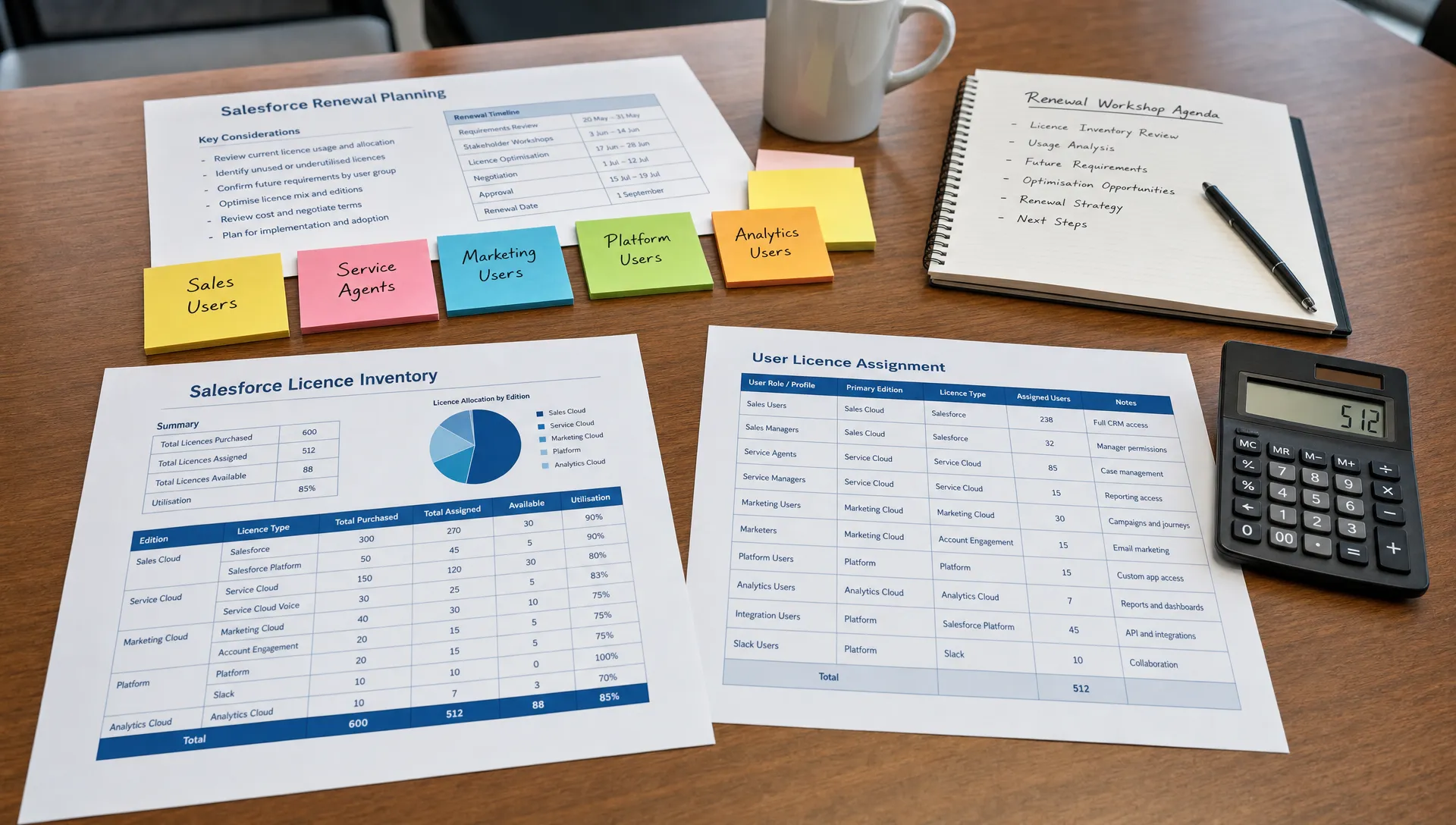
This is where IT, finance and procurement need to work from the same evidence pack. The pack should include active users by licence type, assigned permission set licences, last login dates, login frequency, object usage, profile and role data, integration users, department owners and known joiner or leaver changes.
Last login is useful, but it is not enough on its own. Some users may be active through integrations or single-purpose processes. Others may log in often but only view one dashboard. A sensible review combines usage signals with business validation.
If you have not already separated dormant users from genuine demand, start there. Inactive accounts can quietly distort forecasts, renewal baselines and internal budget allocation, which is why we have covered how inactive users distort your Salesforce budget in more detail.
The important point is discipline. Do not turn one metric into a decision. Use the data to create questions, then validate those questions with the people who own the work.
Where the licence mix usually drifts
Licence mix drift rarely comes from one reckless decision. It usually comes from a series of reasonable requests made over time.
A new region launches and asks for full access. A project team gets licences for a rollout and keeps them afterwards. A manager inherits dashboards but never gives up edit access. A workflow changes, yet the permission set licences stay attached. A team uses Salesforce to manage internal tasks because it is already there.
That last point is worth pausing on. Not every workflow belongs in Salesforce. If a team mainly needs boards, timelines, time tracking and file-based collaboration, a dedicated project management tool may be a cleaner fit than extending Salesforce access to users who do not need CRM data.
The cost issue is only part of the story. When non-CRM work is placed inside Salesforce, access often expands beyond what the user really needs. That can create avoidable spend and unnecessary data exposure.
Turn usage data into renewal decisions
Once the baseline is clean, the next step is to convert it into a decision model. The goal is not to arrive at a perfect answer for every individual user. It is to create defensible cohorts that can be discussed with business owners and used in renewal planning.
| Decision | Evidence to look for | What to agree before renewal |
|---|---|---|
| Keep full access | Frequent creation or update of core CRM records, clear business dependency | Confirm the user group and expected headcount |
| Move to a lighter access model where contractually available | Low edit activity, mainly reporting, approvals or limited process interaction | Validate that required workflows still function |
| Remove or reassign | No meaningful use, duplicate account, role change or leaver signal | Confirm deactivation timing and data ownership |
| Separate integration access | Non-human usage, middleware activity or shared technical accounts | Assign an owner and test least-privilege access |
| Hold as planned demand | Confirmed project, hiring plan or rollout with dates | Decide whether to contract now or preserve flexibility |
This creates a commercial conversation that is much stronger than “we want fewer licences”. It becomes “these user groups need full access, these groups do not, these users are not active, these permissions are no longer aligned, and this is the volume we can defend”.
For procurement, that is the difference between negotiating from preference and negotiating from evidence.
Do not wait until the renewal quote arrives
Right-sizing should begin well before the renewal event. For larger Salesforce estates, six months is not excessive. The audit itself may be quicker, but internal alignment takes time.
The reason is simple: once a renewal quote is in motion, the commercial frame has often already been set. Sales forecasts, approval paths and discount structures may already assume a certain baseline. If you challenge the mix late, you may still get movement, but you are working uphill.
Mid-contract reductions are usually much harder than buyers expect. Unused licences do not automatically create a right to reduce committed spend, and the contract language matters. If you are relying on a future scale-down after signing, it is worth reading our note on whether Salesforce mid-contract reductions are actually possible.
A better path is to bring the right-sized mix into the renewal strategy early. That means agreeing the baseline internally before Salesforce’s commercial process narrows your options. It also means linking the licence review to negotiation preparation, not treating it as a separate admin exercise. We have written more broadly about Salesforce negotiation tactics that improve leverage, and licence evidence is one of the practical inputs that makes those tactics credible.
Watch the quiet traps
A few traps appear again and again in licence reviews.
The first is relying only on last login. Login data can identify obvious waste, but it cannot tell you whether a user is over-licensed. Someone may log in daily and still only need narrow access.
The second is ignoring permission set licences and add-ons. A named user licence may look appropriate, while attached entitlements quietly inflate the true cost of that user.
The third is treating deactivation as purely an IT task. Removing access can affect reporting ownership, approval chains, integrations and data stewardship. Business validation is not bureaucracy. It protects the review from avoidable mistakes.
The fourth is focusing too heavily on unit price. A good discount on the wrong mix is still a poor outcome. The renewal objective should be the right commercial structure, not just a lower number on one line.
A practical 30-day review rhythm
You do not need to boil the ocean. A focused 30-day review can create enough clarity to support a renewal conversation, especially if the estate is already reasonably documented.
Week 1: Gather the facts
Pull contracted entitlements, assigned licences, permission set licences, recent usage, last login, role data and known organisational changes. Make sure finance, IT and procurement are looking at the same version of the truth.
Week 2: Build user cohorts
Group users by work pattern rather than department alone. Identify full-use populations, light-use populations, inactive users, technical users and uncertain cases. The uncertain cases are not a failure. They are the questions that need business input.
Week 3: Validate with owners
Speak to the leaders who own the workflows. Ask what access is essential, what has changed, what will change in the next contract term and which users are only there because of history.
Week 4: Shape the renewal position
Turn the findings into a clear ask: licences to retain, licences to reduce where possible, users to move, entitlements to challenge and flexibility needed for future demand. This is also the moment to decide what you will not buy again without a named owner.
Frequently Asked Questions
What is a Salesforce user licence mix? It is the combination of Salesforce licence types and related access rights assigned across your users. A healthy mix matches licence level to actual work, usage and business need.
How often should we review Salesforce user licences? At minimum, review them before every renewal. Larger or fast-changing organisations should also run quarterly checks so leavers, role changes and project users do not inflate the baseline.
Can we reduce Salesforce licences during the contract term? Sometimes contracts allow limited changes, but many Salesforce commitments are not easy to scale down mid-term. The safest approach is to right-size before renewal, when the commercial structure is still open.
Is last login enough to identify wasted licences? No. Last login is a useful signal, but it does not show whether the user has the right level of access. Combine it with object usage, permission assignments, business role and workflow dependency.
Should every manager have a full Salesforce licence? Not automatically. Some managers need full access, especially if they actively manage records. Others mainly consume reports or approve items. The licence decision should follow the work, not the job title.
Bring a cleaner licence mix to your next renewal
Right-sizing your Salesforce user licence mix is not about squeezing the platform. It is about removing guesswork before the renewal conversation begins.
The best outcomes come when finance, IT and procurement share one evidence base, agree what the business genuinely needs and challenge the parts of the estate that no longer match reality.
If you would like a second pair of eyes on your Salesforce baseline, SaaSed offers a complimentary Salesforce audit conversation to help identify licence waste, renewal risks and practical next steps before talks begin.
Want this kind of intel on your renewal?
Don’t head into your next software negotiation alone
Contact Us